How to use - vcCommands
Command API
See the vcCommand API, and the addMenuStrings.
Initializing commands
1. Make sure the python command file (.py) starts with a prefix "cmd_", for example, "cmd_MyFirstCommand.py".
The prefix is used to recognize the command files in Visual Components.
2. Save your commands to the following folder:
C:\Users\%USERNAME%\Documents\Visual Components\%VERSION%\My Commands\Python 3
Alternatively, drag-and-drop the command file to the 3D scene which registers the command regardless of the file location. Note that, this approach needs to be repeated every time Visual Components is started.
Command Template
Template command in user interface.
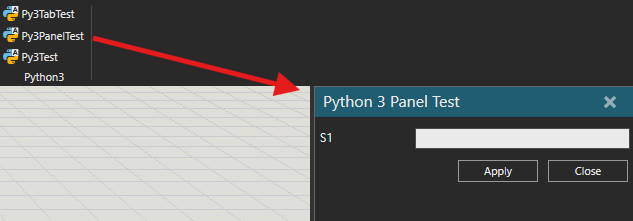
Template command script.
# Executed on software start and when recompiled
import vcCore as vc

app = vc.getApplication()
cmd = vc.getCommand()

def OnInit():
  """Executed only once at initialization.
  Defines the name and the location for the command in the user interface."""
  cmd.Name = "Py3PanelTest"
  cmd.addMenuItem('VcTabHome/Python3', "Py3PanelTest")


def OnExecute():
  """Triggered when the command is started from the user interface,
  and opens the command property panel."""
  panel.showCommand(cmd)


def on_cancel():
  """Triggered when the "Cancel" button is pressed on the panel."""
  print ("Canceled")


def on_apply():
  """Triggered when the "Apply" button is pressed on the panel."""
  print('Apply')
  return True # Returned True value closes the panel


def on_close():
  """Triggered when the panel is closed from the "x" button on the top right corner."""
  print("Close")
  return True # Returned True value closes the panel


def on_prop_changed(args):
  """Triggered when the property value is changed."""
  print('New value for S1: ' + prop_s1.Value)


# Create a string property named "S1" to the command panel.
prop_s1 = cmd.Properties['S1']
if prop_s1 == None:
  prop_s1 = cmd.Properties.create(vc.vcPropertyType.STRING, 'S1')
prop_s1.OnChanged += on_prop_changed

panel = vc.vcCommandPanel.new()
panel.Title = "Python 3 Panel Test"
panel.setOnCancel(on_cancel)

btn_apply = panel.createButton("Apply", on_apply)
btn_apply.IsEnabled = True

btn_close = panel.createButton("Close", on_close)
btn_close.IsEnabled = True